 Log in


There is not a broad selection of mature, open-source web-browser engines for Linux users. Most of the browsers available for Linux are based on one of just three projects: Chromium's Blink, Firefox's Gecko, or WebKit. A new entrant would generally be seen as a welcome alternative, but the recent campaign to push one of the LLM-written Nordstjernen browsers into Debian and Arch Linux has raised some questions about the project's development and security processes.
About Nordstjernen
The Nordstjernen project appeared early in 2026; it shipped a 1.0.0 release of its
namesake browser on June 5. However, the release announcement makes mention
of several pre-1.0 releases dating back to late May that seem to have been
scrubbed from GitHub. According to the announcement, the browser engine "is
about 88,000 lines of C written by Claude and Codex [...] small enough for one
person to read and audit end-to-end"
. The development of the browsers seems
to be driven almost entirely by Andreas Røsdal (and LLMs), though there are a
handful of commits attributed to others in the various repositories.
Nordstjernen has a somewhat confusing dual-license scheme. The announcement specifies that it is released under the Nordstjernen Source License v1.0, a non-free custom license that prohibits "competing use", and converts to the MIT license after 10 years. The License.md file in the repository, however, states that the browser is available under the custom license or GPLv3.
Since the Nordstjernen browser was released, two others have followed: Northstar and Southstar. The
Northstar browser, licensed solely under GPLv3, is billed as "the minimalist
sibling of Nordstjernen: a single-window, single-page, single-process desktop
browser
" that leaves out tabs, per-tab rendering, WebGL, and
WebGPU. According to the site, it shares the browser engine with Nordstjernen,
but it also claims that Northstar was written from scratch. Southstar is
described as a Rust version of Nordstjernen, and it carries the same
dual-license scheme.
Please package
Røsdal opened an intent to
package (ITP) bug with Debian on July 23, looking for a sponsor to help
him in getting Northstar into Debian. He reasoned it would be useful for Debian
because the other browsers shipped by the distribution are Blink, Gecko, or
WebKit derivatives; including Northstar would help support "genuine browser
engine diversity
". He is not a Debian maintainer or developer, so he cannot
push a package into Debian on his own. He did state that he intended to maintain
the package long-term, and said that his packages were verified to build for unstable and the upcoming Debian 14 ("forky")
release.
The bug was updated
by Jérémy Lal in October, apparently after Røsdal had lobbied Lal and others
directly by email to include Northstar in Debian. (Why Lal and the others were
chosen specifically is unclear.) Lal provided some positive
feedback but noted "it might be a good idea to not target next debian stable,
given the youngness of this browser
". Røsdal replied
the same day to "pray and beg
" for inclusion of one of the Nordstjernen
browsers in the next stable Debian release.
If the Northstar browser is included in Debian Linux, I will do my utmost to make the browser successful and ensure it works well in Debian, and I will make sure that the Debian project and Debian contributors like you, and the four of you in particular, will be rewarded.
He did not elaborate on the nature of the promised reward, but did mention
that he had applied to the NLnet Restack fund which is meant "to
help deliver, mature and scale operational internet commons across the
technology stack
". Røsdal also made the claim that Nordstjernen, now at about
245,000 lines of C code, would be easy to audit. He suggested that Debian focus
on packaging Nordstjernen, as it was more mature, but use the English name
Northstar.
Gard Spreemann said
that the project's Git repository cast doubt on the easy-to-audit claim. He calculated that
there were 2,623,722 insertions and 1,527,351 deletions over the lifetime of the
repository. "I struggle to reconcile your goal of 'more maintainable, ease of
review and audit' with ~160k lines of code being added and ~100k being removed
per person per month.
"
After some back-and-forth, Spreemann asked
Røsdal: "Is the code of Nordstjernen reviewed (by the human beings who
are responsible for the project), or is it not?
" He added that it was
unlikely any Debian developer would agree to maintain a package with so much
churn without the people responsible even looking at the code. "This is
insane, and nothing more than a toy or an experiment, certainly not a fit for
Debian by a mile.
"
Røsdal ignored
the question about human code review and replied that he would appreciate
feedback from someone else: "Preferably from someone who actually works on
real software development in 2026, someone with education in computer science,
also considering that software development has changed with the introduction of
AI llms
".
To the list
On October 18, Røsdal appealed to the debian-devel mailing list to accept one of the Nordstjernen browsers into Debian. Andrey Rakhmatullin asked if the plan was for Røsdal to do the packaging himself or if he wanted others to do it. Røsdal replied that he planned to do it, but he expected frequent releases and would be open to help from the Debian community to help package all the variants of the browser.
Marc Haber responded to
the thread to clarify something he felt was often misunderstood by authors
who just want their program in Debian: "You cannot fix a security issue in
Debian stable by just uploading the new version of your program, you need to
[build] a patch that only fixes the security issue while keeping everything else
in the package at the state it was in at the release of the respective Debian
stable.
" That would require a supported version for at least three
years. None of Røsdal's responses to the thread seem to acknowledge the need for
a version with long-term support and security backports.
The request to package the browser also spawned a discussion around the
licensing for the browsers. For example, Andrei Ionuţ Ştefan asked
if Røsdal had reviewed the LLM-generated output to ensure that there was no
verbatim reproduction of copyrighted code from the training data. Spreemann said that it seemed doubtful
that Røsdal could claim copyright if he was not even reviewing the majority of
the code generated by LLMs. After a few exchanges, Røsdal said
that each improvement to the browsers had been small, incremental changes where
he had verified the results afterward. "It's like an artist painting a painting, one
stroke at a time.
"
The overarching question of whether LLM output is copyrightable, or how much
human input is necessary for it to be so, remains unanswered. Ted Ts'o observed that
participants in the discussion seemed to be looking for the threshold of
human-generated code to allow a project to be copyrighted. "If 99% of the
code is human-generated, and 1% LLM-generated or public domain code, can we
consider the entire code base under the GPL license? What if it's 60% / 40%?
What if it's 99% LLM or public domain, and 1% human-generated GPLv2
changes?
" He doubted that Debian would be able to answer the question of how
much code had to be generated by a human to be copyrightable, but he hoped
that if Debian created a policy requiring a certain percentage to be
human-generated that the Linux kernel would pass muster.
Security
After briefly weighing in about licensing, Ts'o (who is employed by Google) followed up on Northstar's security. He had run an experiment using one of Google's frontier models to see if Northstar adhered to its security policy, and if there seemed to be any deliberate backdoors. The 15-page report produced by the LLM claimed a number of discrepancies between the project's claimed security model and its actual code, as well as a number of critical security flaws.
The report says that the LLM found no backdoors; however, it identified undocumented environment hooks that automatically load extensions, silently grant webcam access to all sites, and more. It also noted that, for example, the pack-appimage.sh script would download and execute unverified binaries. The script has since been updated to pin build tools to fixed releases and verify their SHA-256 sums before executing them. In total, the report lists eight critical and eight high-severity vulnerabilities. In his reply to the bug summarizing his findings, he said he would not recommend that any user depend on Northstar if they care about their security.
He also suggested that the Northstar project consider rescinding its no-AI policy, which had
been added to the project's README on October 22. The project now claims
that the Northstar browser is being developed without AI starting in
October 2026. "Contributions — code, documentation, translations, issues
and pull requests — must be written by people, not generated by AI coding
assistants, large language models or similar tools.
" However, there have
been more than 70 commits that list Claude Opus 5.5 as co-author since
that date.
Initially, Røsdal thanked
Ts'o for his findings and said he would welcome a follow-up security review to
verify that the issues had been addressed. However, he replied
again to the thread to say he thought Ts'o was biased because he works for
Google. "Therefore in my opinion the Nordstjernen web browser was not given a
fair chance by the Debian community, and I will focus on other Linux
distributions which does not have Google-/corporate-biases like Debian does in
this instance.
"
Off to Arch
On October 24, Røsdal contacted the Arch Linux project via the aur-general list, which is for discussion about the Arch User Repostory (AUR). Typically, users can upload packages to the AUR without much oversight. However, new user registration has been turned off most of the year since it was subject to sustained attacks attempting to spread malware to unsuspecting Arch Linux users. Thus, Røsdal would have to receive assistance to create an account and upload packages to AUR—at least for the time being. It is unclear when registration will be re-enabled for the AUR.
After some discussion, some of it in favor of a new entrant to the browser
ecosystem, Edmund Lodewijks brought
up Røsdal's attempt to convince Debian to include Northstar. He cautioned
against packaging the browser. Røsdal claimed
that all of the issues raised in the report Ts'o generated were resolved. He
reiterated his complaint that Northstar had not been given a fair evaluation,
and said that while Claude had been used to develop the browsers "we will
transition [Northstar] to be maintained in the traditional way
".
Jelle van der Waa replied
that browsers are complex pieces of software with big security and privacy
concerns; users should not trust a young project for such things. He suggested
that Røsdal continue development, get a good security review, and demonstrate
that he could maintain the browser over the long term. "Maybe then people might be
interested in packaging it in the AUR but for now I can only strongly
recommend against it
".
Status
It does not appear that Northstar will be appearing in the AUR or Debian repositories anytime soon. Whether Røsdal will adhere to the stated no-AI policy also remains to be seen; thus far it does not seem that Claude has made its last contribution to the browser.
Since the XZ backdoor, distribution developers are also likely to consider an over-eager maintainer lobbying for a new project's inclusion to be something of a red flag. A browser project that has less than six months development history and no community to speak of is, in a word, suspicious. Røsdal's motives may well be entirely benign, but it is hard to blame Debian and Arch maintainers for being cautious.
In fairness to Røsdal and Northstar, it is not as if the established browser projects are without security concerns of their own. For instance, Debian issued a security advisory (DSA-6577-1) for the chromium package in Debian 13 on October 22: it addressed 363 CVEs. The previous advisory for chromium (DSA-6562-1) which was sent on October 15, listed a mere 37 CVEs. The Chromium project is also notoriously difficult to package, with quite a bit of churn of its own.
Firefox 159, released on October 27, listed more than 100 high-impact vulnerabilities including 72 use-after-free flaws and five privilege-escalation flaws. Chromium and Firefox, however, do have a much larger set of developers working on them and quite a few people scrutinizing the projects' code.
There is clearly interest in a new browser project that is based on a new open-source browser engine. Many of us are watching the Servo project, for example, with great interest. However, an entirely or mostly vibe-coded browser project that is largely driven by a single developer is not something that seems likely to gain traction among Linux users who care about privacy, security, or stability.
I dunno how corrupt you think everyone else is, but starting with bribery is not a good look.


Electronic Arts is shutting down renowned Canadian studio BioWare, Bloomberg reported Wednesday. Four hundred jobs will be cut, which is around 3% of Electronic Arts' staff; fifty of those jobs were from BioWare alone, per the report. BioWare was reportedly working on the next Mass Effect game, which has been canceled, Bloomberg reported, citing an interal memo to staff from Electronic Arts chief operating officer David Tinson and chief studios officer Cam Weber.
BioWare confirmed the studio closure in a post on X shortly after Bloomberg's report was published.
— BioWare (@bioware) October 21, 2026
"Now, after more than three decades of shared adventures, BioWare is closing and early development on the next Mass Effect project is ending," BioWare wrote in the post. "There is nothing easy about writing those words. Our focus riht now is on our incredibly talented team who put their hearts into these games, and supporting one another through this transition."
Electronic Arts is also canceling a The Sims game called Project Lotus, instead pivoting toward another game currently called Project Evergreen. Electronic Arts will focus on its sports games, Apex Legends, and its licensed IP projects like Iron Man and the next iteration of Star Wars Jedi. Bloomberg reported that Electronic Arts will also pursue the Battlefield franchise, and that Respawn and DICE are working on a new project, "which is likely to be another entry in the Star Wars: Battlefront series."
Electronic Arts was taken private in August in a $55 billion buyout; the Saudi Arabian government's investment fund led that purchase. The deal left $18 billion in debt on the company's books. Electronic Arts told its investors earlier this year it would cut costs, saving up to $700 million, per Bloomberg, by slashing its research and development budget.
BioWare was once one of the industry's most iconic studios, known for the Mass Effect and Dragon Age series, as well as Star Wars: Knights of the Old Republic and Baldur's Gate. It was founded more than three decades ago, in 1995, by Ray Muzyka, Greg Zeschuk, and Augustine Yip. The company was acquired by Electronic Arts, along with Pandemic Studios, in 2007 for $775 million. BioWare has struggled in recent years to match the success of its earlier games. Anthem, its multiplayer shooter released in 2019, failed to meet expectations and was ultimately shut down in 2025. Dragon Age: Veilguard, released in 2024, similarly struggled to meet Electronic Arts' expectations. It was after that game's release where Electronic Arts started to pull apart BioWare, shuffling employees to other studios and laying off others. By 2025, fewer than 100 employees remained at the company.
Electronic Arts' big, public struggles were confirmed in 2023 when Electronic Arts began rapidly cancelling projects and closing studios. Apex Legends Mobile and Battlefield Mobile were canceled, and developer Industrial Toys was shuttered. Hundreds of quality assurance testers were laid off that year, too, shortly before Electronic Arts announced a massive 6% layoff, cutting 775 employees. Fifty BioWare employees were laid off in 2023, too; they ended up suing the company for better severance pay. The results of that lawsuit have not been made public. Layoffs and cancellations continued from there: in February 2024, Electronic Arts laid off 5% of its workers, or roughly 670 people. An early in development Star Wars game was canceled at that time. In 2025, Electronic Arts laid off several hundred people, canceled Cliffhanger Games' Black Panther, and closed the studio. Though Electronic Arts laid off hundreds of people, in March 2025, the studio was up 800 more people than the same time the prior year. The studio has roughly 14,000 employees currently.
The grim reality is that this is not an uncommon course of action in the video game industry. An absurd amount of people are still being laid off each year. Just this year, Microsoft laid of 1,600 people and is expected to cut 1,600 more. The layoffs span companies big and small: Sony Interactive Entertainment, PowerWash Simulator's FuturLab, and Ubisoft are among others who've laid off staff, while Netflix shuttered Oxenfree maker Night School Games.


I tested 25 of the most popular package managers to check whether they detect a compromised package repository injecting malicious code into legitimate packages. This code integrity problem could be solved using cryptographic hashes or signatures, but many package managers are still vulnerable to this threat. Of the 25 package managers reviewed1, fewer than half used lockfiles that checked for tampering by default, and only two verified the integrity of every package they downloaded.
Supply-chain attacks caused by developer compromise are a common story, but imagine what happens if ongoing mitigation attempts, including work by Trail of Bits2, are successful. If developers of popular packages are no longer the easiest targets, attackers will shift their focus to the next weakest link in the system: the package repositories that serve the code. The cryptographic answers to this problem are more subtle than they appear, and many implementations fall short due to deliberate design choices, resource prioritization, or the complexity of developer-friendly solutions.
One natural answer is to include a cryptographic hash of a package’s contents in a lockfile and compare hashes after downloading the package. This automatic verification was the default behavior in about half of the package managers I tested, but others required extra configuration to include or verify these hashes, used hashes in a cryptographically insecure way, or lacked hashes entirely. This is summarized in the following table.
| Verifies integrity | Go, vcpkg |
| Verifies if lockfile is present | Bun, Bundler, Cargo, npm, pnpm, Poetry, SwiftPM, uv, Yarn |
| Verifies with lockfile + extra steps | Conda, Gradle, Pip, NuGet, Pub |
| Does not verify with lockfile or N/A | CocoaPods, Composer, Conan, cpanminus, Gem, Maven, PowerShellGet, PSResourceGet, R |
Table 1: Lockfile-based security of a package manager fetching dependencies from a malicious repository, categorized by how much work it takes a developer to achieve integrity. Experimentally verified for a particular configuration. Caveats detailed below.
Another natural approach is to use signatures, avoiding the need to securely distribute a hash for every package. However, in my tests, only Go verified signatures by default; others required extra configuration, lacked verification code, or did not support signatures.
| Verifies signatures | Go |
| Verifies with configuration | Bundler, Gem, Gradle, Maven, npm, NuGet |
| Missing or incomplete verification | Bun, cpanminus, Pip, pnpm, Poetry, PowerShellGet, PSResourceGet, uv, Yarn |
| No signatures available for verification | Cargo, CocoaPods, Composer, Conan, Conda, Pub, R, SwiftPM, vcpkg |
Table 2: Signature-based security of various package managers. Also experimentally verified and subject to similar caveats.
As both tables show, I found a surprising variation in the cryptographic designs and the level of protection they provide. Despite the challenges, I also found several communities on the frontier of this integrity problem that are bringing improved designs to reality. This post explores those variations, showing where certain designs fall short, why code integrity is harder to solve than it appears, and what cryptographic designs might be adopted in the future.
Simulating malicious package repositories
Studying the cryptographic behavior of 25 package managers is quite the challenge. I wanted to minimize manual analysis, but also be 100% confident when I claim an attack from a malicious package repository is possible. To solve this problem, I built a testing harness based on Docker containers and mitmproxy that dynamically evaluates the security of package managers against a malicious server.
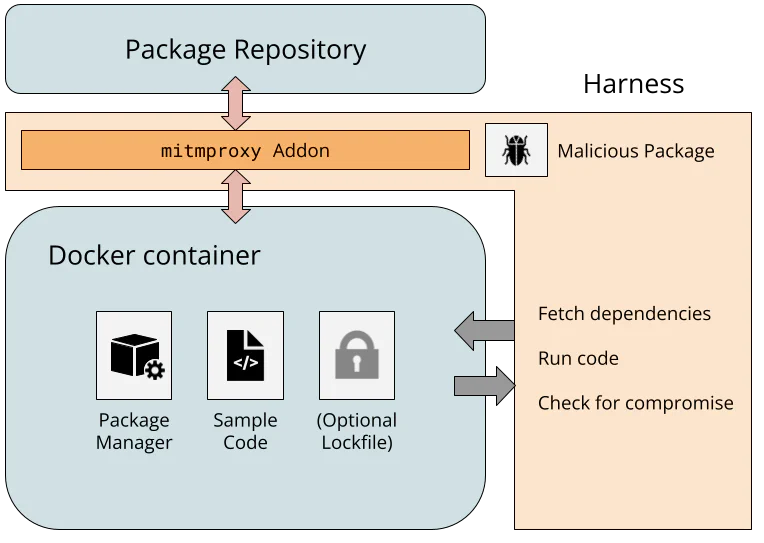
The Ubuntu-based Docker images include a package manager, sample code, and optionally a lockfile. There are conflicting opinions about whether to include lockfiles in source code repositories, so I tested both configurations. The harness instructs the package manager to fetch dependencies from the repository, and the resulting network request routes through a WireGuard network to a custom mitmproxy addon.
Because the mitmproxy TLS CA is installed in the Docker image, the addon can fully manipulate the plaintext from the package repository, simulating a compromised server. I assumed any web-facing server could be compromised (e.g., Composer fetches metadata from Packagist and packages from GitHub), but backend resources, like any private signing keys, remain secure. The simulated repository embeds malicious code into the downloaded packages, and if the sample code executes the malware, the attack is successful.
I tried to keep the experimental setup reflective of real-world usage, but there are limitations. I installed the latest package manager versions, followed quickstart guides for setting up sample projects inside the container, and picked popular packages from public repositories to infect. I ran package manager commands with default flags to see if extra steps, like modifying the project manifest or running extra commands, were needed to enforce cryptographic integrity. However, I am limited to testing a single package with a single package manager version on a single platform, and the test conditions (e.g., PowerShell and CocoaPods on Ubuntu) may not represent the most common usage patterns. The setup isn’t meant to show that every developer is vulnerable to a malicious package repository, just that a developer following reasonable conventions is.
With the package managers installed and network intercept functional, one (mostly) promising observation is clear.
HTTPS is (almost) everywhere
Our harness architecture captures all network traffic, so it’s easy to test that package managers are using TLS and validating the certificates. In almost every package manager, they are.
The exception is cpanminus, the frequently recommended package manager for Perl. cpanminus uses unencrypted HTTP by default to connect to the Perl package repository, allowing any active network attacker to inject malicious code into downloaded packages. This vulnerability has been known for years, but the cpanminus developer has not switched to HTTPS, since doing so would be a breaking change to default behavior.3
Hash functions don’t always provide integrity
By using the mitmproxy addon to modify the package repository responses, I could investigate how different package managers use cryptographic hashes. Hashes are a natural way to ensure that a downloaded file has not been tampered with, but the main question is how the package manager learns the correct hash in the first place.
Microsoft’s vcpkg package manager for C and C++ libraries offers an interesting example. The package manager source code includes content hashes for thousands of dependencies. When a developer updates their library and wants to register the new content in vcpkg, they recompute the hash of their package and open a pull request against the vcpkg source code with the new hash and link to the package. When a package is downloaded by vcpkg, the hash is checked. So as long as the package manager is trusted, this approach is fully secure against a malicious package repository.4
Hashes in lockfiles
It is significantly more common that the package manager learns the correct hash via a lockfile. A lockfile is frequently created by a package manager, resides alongside a project’s source code, and references specific versions of dependencies needed by the project. If a developer checks a lockfile with cryptographic hashes into the source code repository, and the user’s package manager validates downloaded packages against the hashes, then the user’s dependencies perfectly match the developer’s.
This is how it works for the Bun package manager for JavaScript projects. Installing a package with bun add updates the bun.lock lockfile; committing the lockfile to Git and calling bun install on another copy of the repo verifies the hash in the lockfile against the new copy of the dependency. Similar behavior is found in npm, pnpm, and Yarn (also JavaScript package managers); uv and Poetry (Python package managers); Bundler (for Ruby); Cargo (for Rust); and SwiftPM (for Swift).
Other package managers support lockfiles, but with more steps than the standard add/restore process. Python’s Pip has experimental support for the pylock.toml format, and Conda has the optional library Conda lock. NuGet, the .NET package manager, generates a lockfile after adding the RestorePackagesWithLockFile property to the project.
Many package managers (Maven, R, PowerShellGet, PSResourceGet, and cpanminus) do not have dedicated lockfiles, and some have lockfiles (Gradle’s gradle.lockfile5 and Gem’s Gemfile.lock) without hashes in them.
Hashes present, but not for integrity
Surprisingly, I found a few examples where the lockfiles had a hash, but could still be compromised by a malicious server. This is not necessarily reflective of a vulnerability, since the underlying behavior is clearly documented, but it shows how there are multiple valid opinions about how lockfiles should be structured and consumed. Nevertheless, a user who is accustomed to the behavior of one package manager may be surprised by that of another.
The first example is the Pub package manager for Dart and Flutter. The following excerpt of a pubspec.lock file includes a SHA-256 hash for the uuid package.
uuid:
 dependency: "direct main"
 description:
 name: uuid
 sha256: "9b129329f58692f6e6578329498a8fe9fbe98f090beb764ffbb8ee2eadd01dcd"
 url: "https://pub.dev"
 source: hosted
 version: "4.6.0"
If a user calls flutter pub get to fetch dependencies, Pub downloads the package from the pub.dev server and computes the hash of the returned binary. If there is a mismatch, Pub detects the error, but installs the package anyway.
The existing content-hash from pubspec.lock doesn't match contents for:
 * uuid-4.6.0 from "https://pub.dev"

This indicates one of:
 * The content has changed on the server since you created the pubspec.lock.
 * The pubspec.lock has been corrupted.

The content-hashes in pubspec.lock has been updated.
This is documented behavior, and requires the non-default --enforce-lockfile option to block installation6.
Overwriting the lockfile after a hash mismatch was also the default behavior in pnpm until version 11.4 from May 2026, when it was changed to close “supply-chain holes.” Like Pub, pnpm also supported a non-default --frozen-lockfile flag, indicating that the previous behavior which updated the lockfile was expected.
Next, here is an excerpt of a conan.lock file, used by the Conan package manager for C and C++.
"requires": [
 "zlib/1.3.1#cac0f6daea041b0ccf42934163defb20%1765284699.337"
],
This includes the package name (zlib), the version number (1.3.1), a recipe revision cac0f6daea041b0ccf42934163defb20, and a timestamp. The 128-bit revision is an MD5 hash that includes source code. However, this hash is not intended to provide cryptographic security, but rather serves as a unique identifier. When Conan installs dependencies using this lockfile, it uses the recipe revision hash to download a particular file from the ConanCenter repository, but it does not recompute the recipe hash. Even if it did, there’s a separate package revision hash for platform-specific binaries that is not in the lockfile, and MD5 collisions could allow an attacker to create two distinct recipes with different behavior but the same hash.
The CocoaPods dependency manager for Swift and Objective-C has a similar pattern. Here is part of a Podfile.lock file for a project that uses the popular Files dependency.
SPEC CHECKSUMS:
 Files: d88e31b84d65e754935053b1c584ea8e2320698a
This 160-bit checksum is the SHA-1 hash of the Files Podspec, which contains the following link to the source code. CocoaPods uses this link to fetch the Git repository.
"source": {
 "git": "https://github.com/johnsundell/files.git",
 "tag": "4.0.2"
},
So even though the lockfile can prevent tampering with the GitHub URL in the Podspec (setting aside expensive SHA-1 collision attacks), a compromised GitHub server could just serve a malicious version of the repository with the same tag.
Finally, the Composer dependency manager for PHP includes commit hashes in the composer.lock file, as in the following excerpt.
"dist": {
 "type": "zip",
 "url": "https://api.github.com/repos/guzzle/psr7/zipball/b094ded77ee97a6027ad6cf0e8c7b9f88381814c",
 "reference": "b094ded77ee97a6027ad6cf0e8c7b9f88381814c",
 "shasum": ""
},
However, even though the b094ded... commit hash uniquely identifies the code, the ZIP archive in the URL does not include the Git tree as a way to verify the hash. Once again, GitHub could serve a malicious ZIP archive without detection by Composer.
Lockfiles have many roles besides supply-chain integrity
The previous experimental results show that lockfile hashes often can be used to enforce package integrity, but this is not their sole or even original purpose. Alternatively, they can lock dependencies to a particular functionality, enable an easy way for application developers to share a consistent environment, or facilitate reproducible builds. Analyzing package manager lockfiles through the lens of supply-chain security is a recent interpretation that can be at odds with their original design. The recent change to pnpm’s --frozen-lockfile is one example.
Another example of this tension is the question of whether the lockfile should be committed to version control. Most modern guidance recommends committing the lockfile for applications, since the final build environment is fully controlled. The question is more complicated for libraries, since package managers often ignore libraries’ lockfiles to avoid locking to conflicting transitive dependencies. Committing the lockfile makes it easier to develop the library by sharing a consistent build environment with other developers, but excluding the lockfile makes it easier to catch conflicts with different dependency versions before they are found by users. Many package managers recommend committing the lockfile for libraries (e.g., npm, pnpm, Poetry, uv, and Yarn), some recommend excluding it (e.g., Bundler), and some leave it up to the developer (e.g., Cargo).
Many of these questions are explored in a recent study by Gamage et al. The authors explore lockfile design decisions for seven package managers, analyze published projects, and perform semi-structured interviews with 15 developers. They find that the practice of committing a lockfile varies by which package manager is used, and categorize five benefits to using lockfiles, as perceived by the interview subjects: build determinism, integrity, transparency into indirect dependencies, debugging, and security scanning. Some of the developers also preferred to not use lockfiles, citing a preference for end users to resolve to the latest version of a dependency, which may have more bug fixes and vulnerability patches.
The diversity of package manager designs and views surrounding the purpose of lockfiles makes it difficult to prescribe a single recommendation. With regard to supply-chain integrity, it is common, but not universal, to view lockfiles as a source of integrity that should be committed with the source code. For package managers with lockfiles that do not provide cryptographic integrity, it is worth considering whether their users share that expectation. Even when lockfile hashes can provide cryptographic integrity, locking to specific package hashes means that users do not immediately receive subsequent updates or security fixes, since the newer package has a different hash. This leads to frequent lockfile bumping to distribute the latest hashes. Wanting immediate updates is a separate concern from wanting package integrity, but the current, common approach of using hashes in lockfiles is at odds with that goal. In conclusion, lockfile hashes are often, but not always, effective at providing cryptographic integrity, but do not work in every situation.
Signatures are common; verification is not
Signatures are a natural way to address these shortcomings, but implementations frequently fall short. In theory, developers could sign every release with their own private key, and the package manager could check the signature of the package it downloads from the package repository. In fact, signatures are relatively common in different package ecosystems, but proper signature validation is surprisingly lacking. The reality of using signatures to provide code integrity is more nuanced than it seems, and package managers have different approaches to the problem.
Many package managers have no signatures available. Arguably, vcpkg does not need them, because all package hashes are distributed with the manager, but this leaves Cargo, CocoaPods, Composer, Conan, Conda, Pub, R, and SwiftPM7. The Conan developers are aware and previously decided not to fix it, citing several implementation challenges and suggesting organizations where integrity is critical could run their own repository server. Cargo developers are actively considering different signing designs, but this effort is still in progress. Composer developers have been implementing many new protections against supply-chain attacks, with future plans for artifact integrity.
Repository signing
One straightforward approach, known as repository signing, is when the package repository signs every package once it’s uploaded, and the repository’s public key is distributed with the package manager. This doesn’t solve the problem of a totally compromised package repository, since a malicious package repository could legitimately sign a malicious package, but it would protect against untrusted mirrors or a partial compromise of a package repository’s serving infrastructure.
Repository signatures are used by the npm Registry, the NuGet Registry, and the PAUSE server for Perl module distribution. In the npm Registry, signatures are distributed within package metadata with repository-specific public keys. NuGet Registry repository signatures are found in .signature.p7s files within the distributed ZIP package, again with repository-specific public keys. The PAUSE server takes a different approach, using its GPG key to batch sign the cryptographic hashes of several packages at a time.
Developer signing
Developer signing involves the developer maintaining the private key and signing the package before uploading it to the repository for distribution. This prevents the package repository from tampering with the contents, but it also provides a way for the package repository to authenticate the uploader.
There are two common approaches for a developer asserting their public key. In the first approach, the public key is distributed out-of-band. The Maven Central repository (used by Maven and Gradle) and the RubyGems repository (used by the gem and Bundler package managers) both support this type of developer signing. Maven Central uses PGP signatures, and developer keys are distributed by public keyservers. RubyGems uses self-signed certificates, and their distribution is left to the developers (e.g., rspec). The major difference is that developer signing is mandatory for Maven Central, and optional for RubyGems. Developer signing is rare for RubyGems, due to the lack of an established chain of trust, and a previous attempt to introduce a certificate authority failed.
The second approach involves a chain of trust. The NuGet Registry and PowerShell Gallery both support developer signatures. Neither makes signatures mandatory, but the PowerShell Gallery recommends it and the NuGet Registry has strict requirements if developer signing is used. In both, the developer’s key must chain to a trusted CA, and acquiring a valid code-signing certificate can cost hundreds of dollars per year. The benefit of this approach is that trusted root certificates can be preinstalled on the platform, allowing package managers to verify public keys.
One downside of developer signing is that developers are responsible for key management, and they can lose the ability to update their code if they lose access to their key.
Identity-based signing
An increasingly common middle ground is “identity-based” or “keyless” signing from Sigstore. Rather than require developers to manage long-term private keys, a developer can use Sigstore’s Fulcio CA to issue a fresh signing certificate on demand, for free. To prevent impersonation, the developer proves their identity with an OIDC token: a cryptographically signed statement from a third party like Google, Microsoft, or GitHub that attests to the email address, username, or potentially other claims about the developer’s identity. The verifier can check that the username is correct and the certificate chain links back to Sigstore Fulcio’s root certificate, proving that someone with access to that account created the signature.
Keyless signing is particularly useful because it can be integrated into a developer’s existing workflow-based deployment pipeline. This is frequently called provenance attestation or trusted publishing8. GitHub and GitLab provide OIDC tokens to Actions and CI/CD workflows that attest to the build workflow, the repository, and the commit hash. A workflow can use this token to obtain a signing certificate from Sigstore, sign the built package, and upload the signed package to the package repository. Since the signing certificate includes the commit hash and workflow details, this cryptographically links the built binary artifact to its source code.
Provenance attestation via Sigstore is supported by Python’s PyPI, the npm Registry, RubyGems repository, and Maven Central. While Sigstore attestations are not mandatory, there is already better adoption than RubyGems’ optional support for developer-managed signing keys.
Verification code is skipped, unconfigured, or nonexistent
Unfortunately, just because these signatures exist does not mean they are being verified by package managers.
In the npm package manager, the repository signatures are not checked when running npm install. Checking the signatures requires running npm audit signatures, which uses Sigstore to validate the registry public keys and then validates the signatures of the installed packages. pnpm recently added the pnpm audit signatures command, but that implementation fetches the registry public keys from the potentially malicious registry rather than verifying with Sigstore, so an adversary could simply add their own key and signature. Bun and Yarn currently lack an equivalent audit signatures command.
In the NuGet package manager, the default signatureValidationMode is accept, which installs invalidly signed packages. The user must set this to require and configure the list of trusted signers, such as with dotnet nuget trust source. These configurations (which include the repository public keys) can be securely distributed within a nuget.config configuration file, functioning as a lockfile that locks the trusted signers.
Ruby’s Gem and Bundler, and Java’s Maven and Gradle, which all use repositories with developer signatures, do not verify signatures by default. They require the user to manually add developer public keys (gem cert --add) or list the allowed public keys that should be trusted. In Maven, one can use the third-party pgpverify-maven-plugin with pgp-keys-map.list to specify the trusted PGP fingerprints. Gradle offers dependency verification, which works similarly.
Finally, several package managers seemingly lack any sort of verification code at all. Pip, uv, and Poetry do not currently have a way to verify identity-based attestations described in PEP740. cpanminus does not have a way to verify the integrity of the repository-signed CHECKSUMS file. It once did, but in response to a verification bypass vulnerability, this verification code was removed. Even though PowerShell is supported on non-Windows platforms, Authenticode signature verification is not9. At one point, the PowerShell repository noted that this issue “should be fixed in a future release.”
Go package management and transparency logs
Go’s built-in package manager is the only one I tested that verifies signatures by default, and it also introduces one final concept for cryptographic package integrity. When go get or go mod download fetches a package10, it hashes the package contents and compares the hash, package name, and version against the checksum database. The contents of the database are registry-signed (analogous to PGP signatures in Perl’s PAUSE server), and the default checksum database public key is hardcoded in Go’s source code. As long as the checksum database’s private key is used honestly, this design ensures that the package name and version are enough to uniquely identify the binary contents of a package. As a result, the go.mod lockfile achieves package integrity without needing to store cryptographic hashes.11
Go’s checksum database is an example of a transparency log, or an immutable, global, tamper-resistant log of metadata. The same capability is provided by Sigstore’s Rekor and certificate transparency logs. In package managers, it cryptographically ensures that the package manager only ever installs the same binaries recorded by the transparency log. If everyone agrees on the transparency log, then everyone agrees on the package contents. This makes it more difficult for an adversary to selectively and undetectably target a victim with a malicious package. Transparency logs can still fail if there are other vulnerabilities, the log’s private key is compromised, or no one checks the transparency log for malicious behavior.
Of all the package managers I tested, Go performed the best at maintaining cryptographic integrity in the face of a compromised package repository or proxy. However, the registry-signature-like design means that much of the system’s trust is concentrated in a single private key.
A proposed cryptographic design for package managers
One potential approach that combines the ideas in this post is to include signature information in the lockfile. Rather than commit to the hash of a particular package, the lockfile could commit to a developer’s identity or public key. This reuses much of the infrastructure in place for lockfile hashes, but it separates the question of immediate updates from the question of package integrity.
With this design, the lockfile could specify a single dependency version (for build reproducibility) or a lower bound (for immediate updates), and the included identity ensures that a malicious repository or proxy cannot easily tamper with whatever package version the manager resolves to. In addition, a transparency log can protect against selective targeting, building on Sigstore’s identity-based signing and transparency log service. Sigstore avoids long-lived keys by default, but it also supports self-managed keys, KMS providers, and hardware tokens. This gives an easily adopted and secure default while still giving flexibility to developers who desire more control over their keys.
This idea is not new and not my own. Attestation identities are part of the pylock.toml Python lockfile specification, the trusted-keys in Gradle’s verification metadata, and the pgp-keys-map.list file in the pgpverify-maven-plugin for Maven. This is the direction that many package managers are already moving towards, as evidenced by the increasing adoption of Sigstore into publishing workflows, attention on supply-chain security, and bugfixes that specifically cite potential tampering by a malicious adversary. There is increasing recognition that this is a problem, and increasing appetite to fix it.
It won’t be easy. There are many subtle nuances that have to be considered and addressed, signing verification code needs to be developed and audited, and developers need to adopt the resulting design. In many of the package managers I reviewed as part of this project, I found communities of people who have been thinking about and pushing for cryptographic integrity and package signing for years. They know best what those package managers need, and they deserve the resources to make this a reality.
One of the greatest cryptographic success stories in the past decade has been the nearly universal adoption of HTTPS, driven in part by industry and community recognition of the security risks of unencrypted traffic, and the nonprofit Let’s Encrypt providing free and easy-to-use TLS certificates as a public good. Package signing is in a similar state now to where HTTPS was a decade ago: persistent adversaries are a huge concern, and cryptographic security is nearly nonexistent. Universal package signing is not here yet, but it is on the horizon. With the right attention and investment, we can make it a reality.
Acknowledgments
Thank you to William Woodruff for valuable discussions about lockfiles, identity signing, and the challenges of package manager security.
-
This post focuses on dependency managers for source code rather than system package managers like APT, Chocolatey, or Homebrew. The line between the two is blurred, but concentrating on one helps highlight particular usage and deployment patterns in that group. ↩︎
-
Trail of Bits has several ongoing and completed projects to improve supply-chain security in some of these package ecosystems, including helping address both account takeover threats and the cryptographic integrity problem. ↩︎
-
cpanminus is included in the default Docker container for Perl, but the container build scripts patch cpanminus to use HTTPS by default. ↩︎
-
A subtle distinction here is that vcpkg must be updated using
git pullin order to fetch the latest package hashes, shifting the question from securely installing packages to securely updating the package manager. For consistency with other package managers, we do not consider this question, and we note this as a limitation of our threat model. ↩︎ -
Gradle can have a
verification-metadata.xmlfile with content hashes, even thoughgradle.lockfiledoes not. ↩︎ -
Note that some
fluttersubcommands, includingflutter runandflutter test, callflutter pub getby default, so these commands can also overwrite thepubspec.lockfile unless called with--no-pub. ↩︎ -
The SwiftPM client has two main ways to download packages: via Git and via the custom Swift Package Registry Service Specification. The latter supports signatures, and the server protocol is implemented by private services such as JFrog Artifactory and AWS CodeArtifact. As far as I can find, there is no repository for the general public that implements this protocol, so I tested the signatureless Git format. ↩︎
-
Trusted publishing can also refer to using OIDC tokens to authenticate to a package repository, and it does not necessarily involve identity-based signing. ↩︎
-
Although I did not test PowerShell on Windows, the documented default
ExecutionPolicybehavior is to block scripts on Windows client machines, and to require a valid signature for Windows servers. This achieves package integrity. ↩︎ -
Go calls these downloadable artifacts “modules,” which consist of “packages.” For the sake of consistent terminology with the rest of the post, I use “package” in the general sense, not the Go-specific one. ↩︎
-
The
go.sumfile stores hashes, but it is not a lockfile. Instead, it is a local cache for entries from the checksum database. ↩︎
The fact that *nearly every package manager since then* has not taken the fucking lesson is depressing.
 reply
reply

It is important to provide credit.
Discuss on Hacker News or Lobsters.
Here is Anthropic describing (archive link) yesterday how their new version control system, Scion, uses a concept called “derived data” to make operations like blames more efficient:
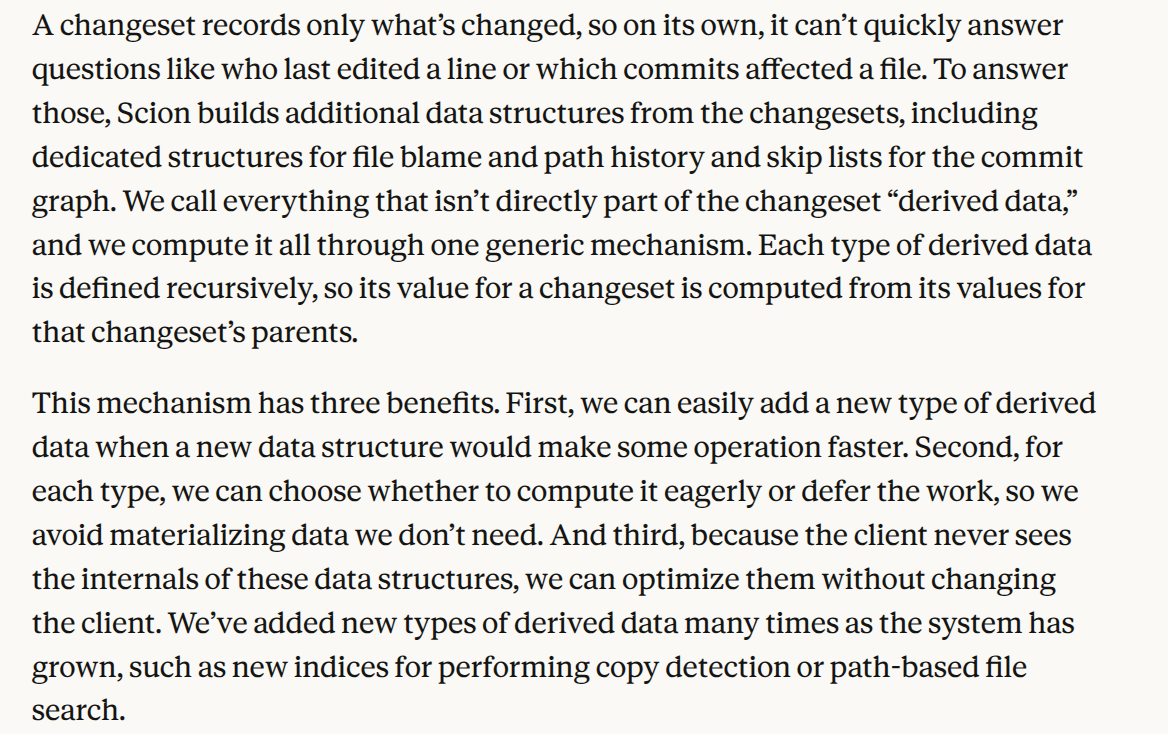
Here is me, back in 2022, describing in my Oxide candidate materials how the Mononoke source control server I helped build uses a concept called “derived data” to make operations like blames more efficient:
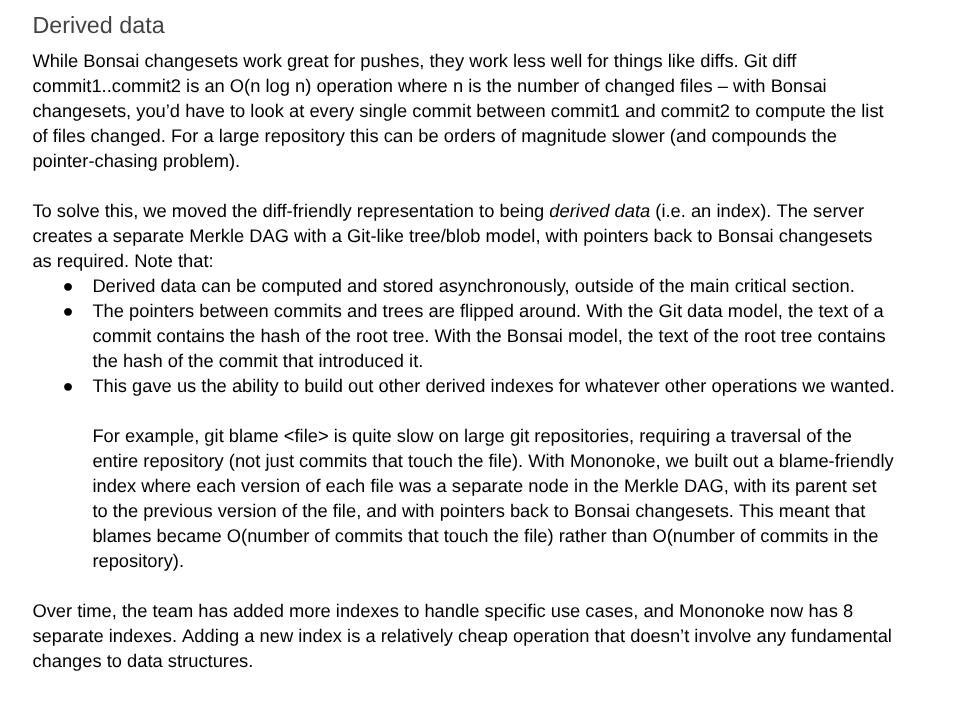
I think the level of imitation goes well beyond having similar insights1. The fact that Sapling was only credited for “hard-won lessons”, and that Mononoke was not mentioned at all, borders on plagiarism. The post comes off as Anthropic claiming that Claude designed all this, while the reality is that our (extraordinary) team at Meta came up with many of the insights that Claude dutifully applied almost a decade later. (We looked at plenty of prior art for Mononoke and Sapling too, from Google’s SrcFS to write-ahead logs in databases.)
I am very glad that the vision our team had back in 2017-18 was so powerful and enduring — when you go against the grain, you’re always a bit unsure if what you’re doing is genius or madness, and I think Mononoke’s design has stood the test of time. And, to be clear, I do not have a problem with Anthropic copying Mononoke’s design. (This is part of why we put out open source — to benefit humanity through the spread of good ideas.)
But as LLMs continue to assist in designing new systems, they are likely to index heavily on existing designs. Mononoke is open source and in every LLM’s training set. If you ask Opus 5.5 or GPT-6 Astra (thanks Matthew Fowle) about prior art, they both immediately point out the similarities to Mononoke.
Giving credit to those that came before us is now easier — and more important — than ever. There is no longer an excuse.
-
For an example of a system with similar insights but many key design differences, see Vicent Marti’s blog post for Cursor. ↩︎
Sony announced that all games from 2028 and onwards would be digital-only. It seems likely that Xbox will follow and that Nintendo will continue making “physical” releases for first-party games during the Switch 2 generation.
In the all-digital gaming future, every game platform will be subject to the same problems and constraints as media streaming services like Netflix and Spotify. We can see hints of how this will affect future games and creative freedom in the medium by looking at re-releases of older games, in particular: Sonic the Hedgehog 3 and Pikmin 2.
The core problem is that digital games are licenses, which forces an ongoing relationship between you and the owner of the media. And because there’s an ongoing relationship with you, any ongoing licensing relationships that the media owner has also affect you and your games. If a license for any media that is part of the game expires or is affected, then the developer must take action to remediate the “issue” in the game.
This is already commonplace for games that feature music, such as Rock Band or Guitar Hero, but maybe players find this more “expected” because these games are essentially a music streaming service in themselves. But what about games that aren’t like this on the surface?

Sonic the Hedgehog 3 for Genesis (1994), GameCube (2002), and Switch (2022)
Sonic the Hedgehog 3 was originally published in 1994, and beyond the game being great to play, the soundtrack is really something special. I have fond memories of dancing to the end credits music on my parents’ bed with my brother as a kid after beating the game.
Unfortunately, this track and many others in the game would not survive our all-digital future. Michael Jackson’s alleged uncredited involvement with Sonic 3 has meant that all re-releases of Sonic 3 since 2009 have not included the entire original soundtrack. If this game were released only digitally today, it can be assumed that these tracks would be pulled from the game, just as is done for Rock Band and Guitar Hero when licensing terms expire or there are legal issues.
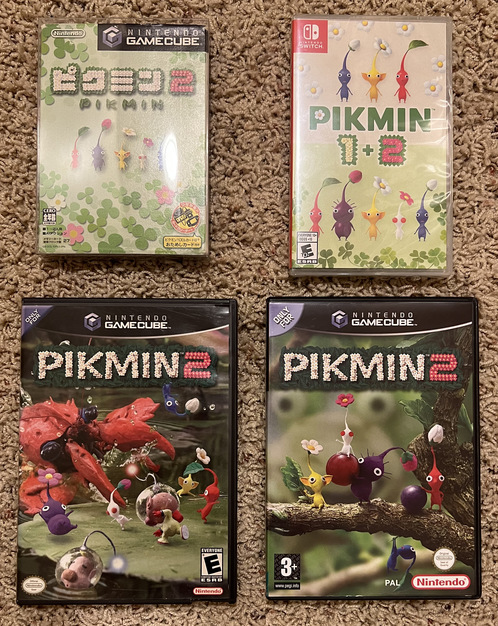
Pikmin 2 for GameCube (JP, NA, PAL, 2004) and Switch (2023)
Pikmin 2 was published in 2004, and the main objective is collecting “treasure” from an alien planet in the form of food, toys, and, most surprisingly, items featuring real-life brands like Duracell, Dr. Pepper, Yoo-Hoo, and Snapple. This artistic decision and the work to license and include these brands were a substantial part of the surprise and delight while playing the game.
However, you can see that these licensing terms eventually run out, too: in all re-releases of Pikmin 2 from 2023 onwards, the real-life brands are replaced with generic fictional brands. It’s not clear to me whether licensing agreements with so many brands would be undertaken in the future if work would have to be done to create fictional models and textures anyway once the license terms expire.
If it wasn’t clear from this post, I’m not excited for an all-digital future of games. An all-digital future for games means the medium will be further constrained creatively, in addition to the negative impacts on ownership and preservation. Read-only physical media does more for gaming than being something to collect and own: developers can make choices that they won’t have to walk back in 20 years, and players can continue to enjoy games as the developers intended long after licensing terms expire.
Thanks for reading ♥ I would love to hear your thoughts! Contact me via Mastodon, Bluesky, or email. Browse the blog archive. Check out my blogroll.