Log in


I tested 25 of the most popular package managers to check whether they detect a compromised package repository injecting malicious code into legitimate packages. This code integrity problem could be solved using cryptographic hashes or signatures, but many package managers are still vulnerable to this threat. Of the 25 package managers reviewed1, fewer than half used lockfiles that checked for tampering by default, and only two verified the integrity of every package they downloaded.
Supply-chain attacks caused by developer compromise are a common story, but imagine what happens if ongoing mitigation attempts, including work by Trail of Bits2, are successful. If developers of popular packages are no longer the easiest targets, attackers will shift their focus to the next weakest link in the system: the package repositories that serve the code. The cryptographic answers to this problem are more subtle than they appear, and many implementations fall short due to deliberate design choices, resource prioritization, or the complexity of developer-friendly solutions.
One natural answer is to include a cryptographic hash of a package’s contents in a lockfile and compare hashes after downloading the package. This automatic verification was the default behavior in about half of the package managers I tested, but others required extra configuration to include or verify these hashes, used hashes in a cryptographically insecure way, or lacked hashes entirely. This is summarized in the following table.
| Verifies integrity | Go, vcpkg |
| Verifies if lockfile is present | Bun, Bundler, Cargo, npm, pnpm, Poetry, SwiftPM, uv, Yarn |
| Verifies with lockfile + extra steps | Conda, Gradle, Pip, NuGet, Pub |
| Does not verify with lockfile or N/A | CocoaPods, Composer, Conan, cpanminus, Gem, Maven, PowerShellGet, PSResourceGet, R |
Table 1: Lockfile-based security of a package manager fetching dependencies from a malicious repository, categorized by how much work it takes a developer to achieve integrity. Experimentally verified for a particular configuration. Caveats detailed below.
Another natural approach is to use signatures, avoiding the need to securely distribute a hash for every package. However, in my tests, only Go verified signatures by default; others required extra configuration, lacked verification code, or did not support signatures.
| Verifies signatures | Go |
| Verifies with configuration | Bundler, Gem, Gradle, Maven, npm, NuGet |
| Missing or incomplete verification | Bun, cpanminus, Pip, pnpm, Poetry, PowerShellGet, PSResourceGet, uv, Yarn |
| No signatures available for verification | Cargo, CocoaPods, Composer, Conan, Conda, Pub, R, SwiftPM, vcpkg |
Table 2: Signature-based security of various package managers. Also experimentally verified and subject to similar caveats.
As both tables show, I found a surprising variation in the cryptographic designs and the level of protection they provide. Despite the challenges, I also found several communities on the frontier of this integrity problem that are bringing improved designs to reality. This post explores those variations, showing where certain designs fall short, why code integrity is harder to solve than it appears, and what cryptographic designs might be adopted in the future.
Simulating malicious package repositories
Studying the cryptographic behavior of 25 package managers is quite the challenge. I wanted to minimize manual analysis, but also be 100% confident when I claim an attack from a malicious package repository is possible. To solve this problem, I built a testing harness based on Docker containers and mitmproxy that dynamically evaluates the security of package managers against a malicious server.
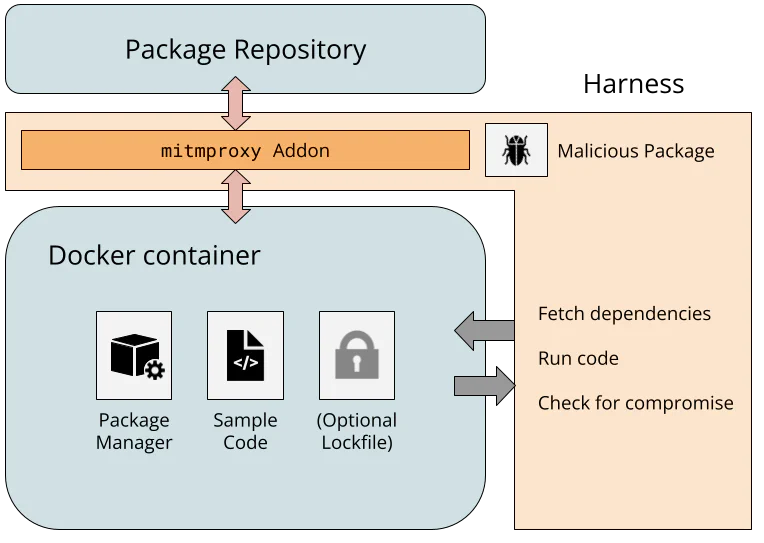
The Ubuntu-based Docker images include a package manager, sample code, and optionally a lockfile. There are conflicting opinions about whether to include lockfiles in source code repositories, so I tested both configurations. The harness instructs the package manager to fetch dependencies from the repository, and the resulting network request routes through a WireGuard network to a custom mitmproxy addon.
Because the mitmproxy TLS CA is installed in the Docker image, the addon can fully manipulate the plaintext from the package repository, simulating a compromised server. I assumed any web-facing server could be compromised (e.g., Composer fetches metadata from Packagist and packages from GitHub), but backend resources, like any private signing keys, remain secure. The simulated repository embeds malicious code into the downloaded packages, and if the sample code executes the malware, the attack is successful.
I tried to keep the experimental setup reflective of real-world usage, but there are limitations. I installed the latest package manager versions, followed quickstart guides for setting up sample projects inside the container, and picked popular packages from public repositories to infect. I ran package manager commands with default flags to see if extra steps, like modifying the project manifest or running extra commands, were needed to enforce cryptographic integrity. However, I am limited to testing a single package with a single package manager version on a single platform, and the test conditions (e.g., PowerShell and CocoaPods on Ubuntu) may not represent the most common usage patterns. The setup isn’t meant to show that every developer is vulnerable to a malicious package repository, just that a developer following reasonable conventions is.
With the package managers installed and network intercept functional, one (mostly) promising observation is clear.
HTTPS is (almost) everywhere
Our harness architecture captures all network traffic, so it’s easy to test that package managers are using TLS and validating the certificates. In almost every package manager, they are.
The exception is cpanminus, the frequently recommended package manager for Perl. cpanminus uses unencrypted HTTP by default to connect to the Perl package repository, allowing any active network attacker to inject malicious code into downloaded packages. This vulnerability has been known for years, but the cpanminus developer has not switched to HTTPS, since doing so would be a breaking change to default behavior.3
Hash functions don’t always provide integrity
By using the mitmproxy addon to modify the package repository responses, I could investigate how different package managers use cryptographic hashes. Hashes are a natural way to ensure that a downloaded file has not been tampered with, but the main question is how the package manager learns the correct hash in the first place.
Microsoft’s vcpkg package manager for C and C++ libraries offers an interesting example. The package manager source code includes content hashes for thousands of dependencies. When a developer updates their library and wants to register the new content in vcpkg, they recompute the hash of their package and open a pull request against the vcpkg source code with the new hash and link to the package. When a package is downloaded by vcpkg, the hash is checked. So as long as the package manager is trusted, this approach is fully secure against a malicious package repository.4
Hashes in lockfiles
It is significantly more common that the package manager learns the correct hash via a lockfile. A lockfile is frequently created by a package manager, resides alongside a project’s source code, and references specific versions of dependencies needed by the project. If a developer checks a lockfile with cryptographic hashes into the source code repository, and the user’s package manager validates downloaded packages against the hashes, then the user’s dependencies perfectly match the developer’s.
This is how it works for the Bun package manager for JavaScript projects. Installing a package with bun add updates the bun.lock lockfile; committing the lockfile to Git and calling bun install on another copy of the repo verifies the hash in the lockfile against the new copy of the dependency. Similar behavior is found in npm, pnpm, and Yarn (also JavaScript package managers); uv and Poetry (Python package managers); Bundler (for Ruby); Cargo (for Rust); and SwiftPM (for Swift).
Other package managers support lockfiles, but with more steps than the standard add/restore process. Python’s Pip has experimental support for the pylock.toml format, and Conda has the optional library Conda lock. NuGet, the .NET package manager, generates a lockfile after adding the RestorePackagesWithLockFile property to the project.
Many package managers (Maven, R, PowerShellGet, PSResourceGet, and cpanminus) do not have dedicated lockfiles, and some have lockfiles (Gradle’s gradle.lockfile5 and Gem’s Gemfile.lock) without hashes in them.
Hashes present, but not for integrity
Surprisingly, I found a few examples where the lockfiles had a hash, but could still be compromised by a malicious server. This is not necessarily reflective of a vulnerability, since the underlying behavior is clearly documented, but it shows how there are multiple valid opinions about how lockfiles should be structured and consumed. Nevertheless, a user who is accustomed to the behavior of one package manager may be surprised by that of another.
The first example is the Pub package manager for Dart and Flutter. The following excerpt of a pubspec.lock file includes a SHA-256 hash for the uuid package.
uuid:
 dependency: "direct main"
 description:
 name: uuid
 sha256: "9b129329f58692f6e6578329498a8fe9fbe98f090beb764ffbb8ee2eadd01dcd"
 url: "https://pub.dev"
 source: hosted
 version: "4.6.0"
If a user calls flutter pub get to fetch dependencies, Pub downloads the package from the pub.dev server and computes the hash of the returned binary. If there is a mismatch, Pub detects the error, but installs the package anyway.
The existing content-hash from pubspec.lock doesn't match contents for:
 * uuid-4.6.0 from "https://pub.dev"

This indicates one of:
 * The content has changed on the server since you created the pubspec.lock.
 * The pubspec.lock has been corrupted.

The content-hashes in pubspec.lock has been updated.
This is documented behavior, and requires the non-default --enforce-lockfile option to block installation6.
Overwriting the lockfile after a hash mismatch was also the default behavior in pnpm until version 11.4 from May 2026, when it was changed to close “supply-chain holes.” Like Pub, pnpm also supported a non-default --frozen-lockfile flag, indicating that the previous behavior which updated the lockfile was expected.
Next, here is an excerpt of a conan.lock file, used by the Conan package manager for C and C++.
"requires": [
 "zlib/1.3.1#cac0f6daea041b0ccf42934163defb20%1765284699.337"
],
This includes the package name (zlib), the version number (1.3.1), a recipe revision cac0f6daea041b0ccf42934163defb20, and a timestamp. The 128-bit revision is an MD5 hash that includes source code. However, this hash is not intended to provide cryptographic security, but rather serves as a unique identifier. When Conan installs dependencies using this lockfile, it uses the recipe revision hash to download a particular file from the ConanCenter repository, but it does not recompute the recipe hash. Even if it did, there’s a separate package revision hash for platform-specific binaries that is not in the lockfile, and MD5 collisions could allow an attacker to create two distinct recipes with different behavior but the same hash.
The CocoaPods dependency manager for Swift and Objective-C has a similar pattern. Here is part of a Podfile.lock file for a project that uses the popular Files dependency.
SPEC CHECKSUMS:
 Files: d88e31b84d65e754935053b1c584ea8e2320698a
This 160-bit checksum is the SHA-1 hash of the Files Podspec, which contains the following link to the source code. CocoaPods uses this link to fetch the Git repository.
"source": {
 "git": "https://github.com/johnsundell/files.git",
 "tag": "4.0.2"
},
So even though the lockfile can prevent tampering with the GitHub URL in the Podspec (setting aside expensive SHA-1 collision attacks), a compromised GitHub server could just serve a malicious version of the repository with the same tag.
Finally, the Composer dependency manager for PHP includes commit hashes in the composer.lock file, as in the following excerpt.
"dist": {
 "type": "zip",
 "url": "https://api.github.com/repos/guzzle/psr7/zipball/b094ded77ee97a6027ad6cf0e8c7b9f88381814c",
 "reference": "b094ded77ee97a6027ad6cf0e8c7b9f88381814c",
 "shasum": ""
},
However, even though the b094ded... commit hash uniquely identifies the code, the ZIP archive in the URL does not include the Git tree as a way to verify the hash. Once again, GitHub could serve a malicious ZIP archive without detection by Composer.
Lockfiles have many roles besides supply-chain integrity
The previous experimental results show that lockfile hashes often can be used to enforce package integrity, but this is not their sole or even original purpose. Alternatively, they can lock dependencies to a particular functionality, enable an easy way for application developers to share a consistent environment, or facilitate reproducible builds. Analyzing package manager lockfiles through the lens of supply-chain security is a recent interpretation that can be at odds with their original design. The recent change to pnpm’s --frozen-lockfile is one example.
Another example of this tension is the question of whether the lockfile should be committed to version control. Most modern guidance recommends committing the lockfile for applications, since the final build environment is fully controlled. The question is more complicated for libraries, since package managers often ignore libraries’ lockfiles to avoid locking to conflicting transitive dependencies. Committing the lockfile makes it easier to develop the library by sharing a consistent build environment with other developers, but excluding the lockfile makes it easier to catch conflicts with different dependency versions before they are found by users. Many package managers recommend committing the lockfile for libraries (e.g., npm, pnpm, Poetry, uv, and Yarn), some recommend excluding it (e.g., Bundler), and some leave it up to the developer (e.g., Cargo).
Many of these questions are explored in a recent study by Gamage et al. The authors explore lockfile design decisions for seven package managers, analyze published projects, and perform semi-structured interviews with 15 developers. They find that the practice of committing a lockfile varies by which package manager is used, and categorize five benefits to using lockfiles, as perceived by the interview subjects: build determinism, integrity, transparency into indirect dependencies, debugging, and security scanning. Some of the developers also preferred to not use lockfiles, citing a preference for end users to resolve to the latest version of a dependency, which may have more bug fixes and vulnerability patches.
The diversity of package manager designs and views surrounding the purpose of lockfiles makes it difficult to prescribe a single recommendation. With regard to supply-chain integrity, it is common, but not universal, to view lockfiles as a source of integrity that should be committed with the source code. For package managers with lockfiles that do not provide cryptographic integrity, it is worth considering whether their users share that expectation. Even when lockfile hashes can provide cryptographic integrity, locking to specific package hashes means that users do not immediately receive subsequent updates or security fixes, since the newer package has a different hash. This leads to frequent lockfile bumping to distribute the latest hashes. Wanting immediate updates is a separate concern from wanting package integrity, but the current, common approach of using hashes in lockfiles is at odds with that goal. In conclusion, lockfile hashes are often, but not always, effective at providing cryptographic integrity, but do not work in every situation.
Signatures are common; verification is not
Signatures are a natural way to address these shortcomings, but implementations frequently fall short. In theory, developers could sign every release with their own private key, and the package manager could check the signature of the package it downloads from the package repository. In fact, signatures are relatively common in different package ecosystems, but proper signature validation is surprisingly lacking. The reality of using signatures to provide code integrity is more nuanced than it seems, and package managers have different approaches to the problem.
Many package managers have no signatures available. Arguably, vcpkg does not need them, because all package hashes are distributed with the manager, but this leaves Cargo, CocoaPods, Composer, Conan, Conda, Pub, R, and SwiftPM7. The Conan developers are aware and previously decided not to fix it, citing several implementation challenges and suggesting organizations where integrity is critical could run their own repository server. Cargo developers are actively considering different signing designs, but this effort is still in progress. Composer developers have been implementing many new protections against supply-chain attacks, with future plans for artifact integrity.
Repository signing
One straightforward approach, known as repository signing, is when the package repository signs every package once it’s uploaded, and the repository’s public key is distributed with the package manager. This doesn’t solve the problem of a totally compromised package repository, since a malicious package repository could legitimately sign a malicious package, but it would protect against untrusted mirrors or a partial compromise of a package repository’s serving infrastructure.
Repository signatures are used by the npm Registry, the NuGet Registry, and the PAUSE server for Perl module distribution. In the npm Registry, signatures are distributed within package metadata with repository-specific public keys. NuGet Registry repository signatures are found in .signature.p7s files within the distributed ZIP package, again with repository-specific public keys. The PAUSE server takes a different approach, using its GPG key to batch sign the cryptographic hashes of several packages at a time.
Developer signing
Developer signing involves the developer maintaining the private key and signing the package before uploading it to the repository for distribution. This prevents the package repository from tampering with the contents, but it also provides a way for the package repository to authenticate the uploader.
There are two common approaches for a developer asserting their public key. In the first approach, the public key is distributed out-of-band. The Maven Central repository (used by Maven and Gradle) and the RubyGems repository (used by the gem and Bundler package managers) both support this type of developer signing. Maven Central uses PGP signatures, and developer keys are distributed by public keyservers. RubyGems uses self-signed certificates, and their distribution is left to the developers (e.g., rspec). The major difference is that developer signing is mandatory for Maven Central, and optional for RubyGems. Developer signing is rare for RubyGems, due to the lack of an established chain of trust, and a previous attempt to introduce a certificate authority failed.
The second approach involves a chain of trust. The NuGet Registry and PowerShell Gallery both support developer signatures. Neither makes signatures mandatory, but the PowerShell Gallery recommends it and the NuGet Registry has strict requirements if developer signing is used. In both, the developer’s key must chain to a trusted CA, and acquiring a valid code-signing certificate can cost hundreds of dollars per year. The benefit of this approach is that trusted root certificates can be preinstalled on the platform, allowing package managers to verify public keys.
One downside of developer signing is that developers are responsible for key management, and they can lose the ability to update their code if they lose access to their key.
Identity-based signing
An increasingly common middle ground is “identity-based” or “keyless” signing from Sigstore. Rather than require developers to manage long-term private keys, a developer can use Sigstore’s Fulcio CA to issue a fresh signing certificate on demand, for free. To prevent impersonation, the developer proves their identity with an OIDC token: a cryptographically signed statement from a third party like Google, Microsoft, or GitHub that attests to the email address, username, or potentially other claims about the developer’s identity. The verifier can check that the username is correct and the certificate chain links back to Sigstore Fulcio’s root certificate, proving that someone with access to that account created the signature.
Keyless signing is particularly useful because it can be integrated into a developer’s existing workflow-based deployment pipeline. This is frequently called provenance attestation or trusted publishing8. GitHub and GitLab provide OIDC tokens to Actions and CI/CD workflows that attest to the build workflow, the repository, and the commit hash. A workflow can use this token to obtain a signing certificate from Sigstore, sign the built package, and upload the signed package to the package repository. Since the signing certificate includes the commit hash and workflow details, this cryptographically links the built binary artifact to its source code.
Provenance attestation via Sigstore is supported by Python’s PyPI, the npm Registry, RubyGems repository, and Maven Central. While Sigstore attestations are not mandatory, there is already better adoption than RubyGems’ optional support for developer-managed signing keys.
Verification code is skipped, unconfigured, or nonexistent
Unfortunately, just because these signatures exist does not mean they are being verified by package managers.
In the npm package manager, the repository signatures are not checked when running npm install. Checking the signatures requires running npm audit signatures, which uses Sigstore to validate the registry public keys and then validates the signatures of the installed packages. pnpm recently added the pnpm audit signatures command, but that implementation fetches the registry public keys from the potentially malicious registry rather than verifying with Sigstore, so an adversary could simply add their own key and signature. Bun and Yarn currently lack an equivalent audit signatures command.
In the NuGet package manager, the default signatureValidationMode is accept, which installs invalidly signed packages. The user must set this to require and configure the list of trusted signers, such as with dotnet nuget trust source. These configurations (which include the repository public keys) can be securely distributed within a nuget.config configuration file, functioning as a lockfile that locks the trusted signers.
Ruby’s Gem and Bundler, and Java’s Maven and Gradle, which all use repositories with developer signatures, do not verify signatures by default. They require the user to manually add developer public keys (gem cert --add) or list the allowed public keys that should be trusted. In Maven, one can use the third-party pgpverify-maven-plugin with pgp-keys-map.list to specify the trusted PGP fingerprints. Gradle offers dependency verification, which works similarly.
Finally, several package managers seemingly lack any sort of verification code at all. Pip, uv, and Poetry do not currently have a way to verify identity-based attestations described in PEP740. cpanminus does not have a way to verify the integrity of the repository-signed CHECKSUMS file. It once did, but in response to a verification bypass vulnerability, this verification code was removed. Even though PowerShell is supported on non-Windows platforms, Authenticode signature verification is not9. At one point, the PowerShell repository noted that this issue “should be fixed in a future release.”
Go package management and transparency logs
Go’s built-in package manager is the only one I tested that verifies signatures by default, and it also introduces one final concept for cryptographic package integrity. When go get or go mod download fetches a package10, it hashes the package contents and compares the hash, package name, and version against the checksum database. The contents of the database are registry-signed (analogous to PGP signatures in Perl’s PAUSE server), and the default checksum database public key is hardcoded in Go’s source code. As long as the checksum database’s private key is used honestly, this design ensures that the package name and version are enough to uniquely identify the binary contents of a package. As a result, the go.mod lockfile achieves package integrity without needing to store cryptographic hashes.11
Go’s checksum database is an example of a transparency log, or an immutable, global, tamper-resistant log of metadata. The same capability is provided by Sigstore’s Rekor and certificate transparency logs. In package managers, it cryptographically ensures that the package manager only ever installs the same binaries recorded by the transparency log. If everyone agrees on the transparency log, then everyone agrees on the package contents. This makes it more difficult for an adversary to selectively and undetectably target a victim with a malicious package. Transparency logs can still fail if there are other vulnerabilities, the log’s private key is compromised, or no one checks the transparency log for malicious behavior.
Of all the package managers I tested, Go performed the best at maintaining cryptographic integrity in the face of a compromised package repository or proxy. However, the registry-signature-like design means that much of the system’s trust is concentrated in a single private key.
A proposed cryptographic design for package managers
One potential approach that combines the ideas in this post is to include signature information in the lockfile. Rather than commit to the hash of a particular package, the lockfile could commit to a developer’s identity or public key. This reuses much of the infrastructure in place for lockfile hashes, but it separates the question of immediate updates from the question of package integrity.
With this design, the lockfile could specify a single dependency version (for build reproducibility) or a lower bound (for immediate updates), and the included identity ensures that a malicious repository or proxy cannot easily tamper with whatever package version the manager resolves to. In addition, a transparency log can protect against selective targeting, building on Sigstore’s identity-based signing and transparency log service. Sigstore avoids long-lived keys by default, but it also supports self-managed keys, KMS providers, and hardware tokens. This gives an easily adopted and secure default while still giving flexibility to developers who desire more control over their keys.
This idea is not new and not my own. Attestation identities are part of the pylock.toml Python lockfile specification, the trusted-keys in Gradle’s verification metadata, and the pgp-keys-map.list file in the pgpverify-maven-plugin for Maven. This is the direction that many package managers are already moving towards, as evidenced by the increasing adoption of Sigstore into publishing workflows, attention on supply-chain security, and bugfixes that specifically cite potential tampering by a malicious adversary. There is increasing recognition that this is a problem, and increasing appetite to fix it.
It won’t be easy. There are many subtle nuances that have to be considered and addressed, signing verification code needs to be developed and audited, and developers need to adopt the resulting design. In many of the package managers I reviewed as part of this project, I found communities of people who have been thinking about and pushing for cryptographic integrity and package signing for years. They know best what those package managers need, and they deserve the resources to make this a reality.
One of the greatest cryptographic success stories in the past decade has been the nearly universal adoption of HTTPS, driven in part by industry and community recognition of the security risks of unencrypted traffic, and the nonprofit Let’s Encrypt providing free and easy-to-use TLS certificates as a public good. Package signing is in a similar state now to where HTTPS was a decade ago: persistent adversaries are a huge concern, and cryptographic security is nearly nonexistent. Universal package signing is not here yet, but it is on the horizon. With the right attention and investment, we can make it a reality.
Acknowledgments
Thank you to William Woodruff for valuable discussions about lockfiles, identity signing, and the challenges of package manager security.
-
This post focuses on dependency managers for source code rather than system package managers like APT, Chocolatey, or Homebrew. The line between the two is blurred, but concentrating on one helps highlight particular usage and deployment patterns in that group. ↩︎
-
Trail of Bits has several ongoing and completed projects to improve supply-chain security in some of these package ecosystems, including helping address both account takeover threats and the cryptographic integrity problem. ↩︎
-
cpanminus is included in the default Docker container for Perl, but the container build scripts patch cpanminus to use HTTPS by default. ↩︎
-
A subtle distinction here is that vcpkg must be updated using
git pullin order to fetch the latest package hashes, shifting the question from securely installing packages to securely updating the package manager. For consistency with other package managers, we do not consider this question, and we note this as a limitation of our threat model. ↩︎ -
Gradle can have a
verification-metadata.xmlfile with content hashes, even thoughgradle.lockfiledoes not. ↩︎ -
Note that some
fluttersubcommands, includingflutter runandflutter test, callflutter pub getby default, so these commands can also overwrite thepubspec.lockfile unless called with--no-pub. ↩︎ -
The SwiftPM client has two main ways to download packages: via Git and via the custom Swift Package Registry Service Specification. The latter supports signatures, and the server protocol is implemented by private services such as JFrog Artifactory and AWS CodeArtifact. As far as I can find, there is no repository for the general public that implements this protocol, so I tested the signatureless Git format. ↩︎
-
Trusted publishing can also refer to using OIDC tokens to authenticate to a package repository, and it does not necessarily involve identity-based signing. ↩︎
-
Although I did not test PowerShell on Windows, the documented default
ExecutionPolicybehavior is to block scripts on Windows client machines, and to require a valid signature for Windows servers. This achieves package integrity. ↩︎ -
Go calls these downloadable artifacts “modules,” which consist of “packages.” For the sake of consistent terminology with the rest of the post, I use “package” in the general sense, not the Go-specific one. ↩︎
-
The
go.sumfile stores hashes, but it is not a lockfile. Instead, it is a local cache for entries from the checksum database. ↩︎
 reply
reply





![[Group photo]](https://lwn.net/images/conf/2026/lpc/ms-group-sm.png)