I'm in the process of fleeing digitalocean in the face of their
funding of organizations run by abhorrent people.
This may prove disruptive for my blog and other resources that were historically hosted there (for 12 years!).
Note: If you can see this, you're using the new server!
Version
1.99.0 of the Rust language has been released. Changes this time
include support for extern "C" variadic functions, the
establishment of functions for obtaining the size and alignment of raw
pointers, a number of stabilized APIs, and more.
The Radicle peer-to-peer
code-collaboration project has disclosed
two critical vulnerabilities in the network protocol used by Radicle
nodes. The first flaw is that the network protocol used by Radicle "does not
give the confidentiality it was expected to give", which allows anyone who
can observe the network between two nodes to read the data exchanged. The second
is that peer authentication is broken and allows impersonation, so an attacker
can spoof their Node ID and read private repositories they should not be able to
read.
In practice, the two flaws are most useful when they can be exploited
together: an attacker on the path sees the Node IDs at both ends of a
connection, and both are normally on the allow-list. That attacker can read
whatever is exchanged while they watch, and can then use a Node ID they saw to
fetch the whole repository on demand. The realistic threat is anyone on the path
between your node and node it syncs with, and no setting or allow-list protects
against them.
We are publishing this before the security update is available. You can act
on it today, and no fix we release later can undo an exposure that has already
happened.
See the post for workarounds that can be used today; a major update that will
be backward-incompatible is underway.
Yikes. 90 days since the first of the 2 bugs was disclosed, so I am assuming the security researcher would have disclosed if Radicle hadn't.
No fix but to wait for a major protocol upgrade without an ETA! (ummm and iroh looks like a paid service even though they pay some lip service to "open source" blah blah...?)
Hacking on Raspberry Pi board internals is one of my favourite topics. I know a bunch of obscure things about these cute little boards. Three years ago, I covered a Raspberry Pi 4 RAM upgrade story. Getting a BGA RAM chip and swapping it in seemed like a no-brainer to me – apart from all the numerous uncertain parts about it, you know. It was a joy to see hackers pull it off, and for it to function as well as it did!
Things changed. You can’t really get RAM chips anymore. You also can’t get RAM sticks. You can’t get even SSDs with RAM chips on them. Even getting Raspberry Pi boards can be hard unless you know where to look. This is where a recent three-minute video by [Jeff Geerling] finds us.
Turns out, Raspberry Pi Foundation pushed binary-blob bootloader changes that limit your ability to upgrade RAM. I’ve known about it since last year through the grapevine, and somehow, as I read about it, this didn’t bother me at all. Not enough to write a Hackaday article about it, even, much less talk about it more widely. Why didn’t it bother me? Today, I sat down and pondered this for a bit.
Here’s my conclusion: I don’t think it’s a big deal at all, even if it seems that many people would disagree. Come in, as you are, and I hope you find my thoughts on the situation entertaining.
How It’s Made
First, some ground facts. This change restricts upgrading the RAM chip on your Pi 4 and Pi 5, as well as Compute Modules. By the looks of it, it does not restrict replacing the RAM chip with a chip of a similar size, quote, “locking devices to their original RAM size”. As such, this does not prevent repair of your Raspberry Pi board, but does somewhat limit your repair part choice, at most.
This restriction is easily bypassable. The bootloader is stored in the SPI flash chip, which can be reflashed using the built-in mask ROM over USB and rpiboot, and you are not prevented from flashing older versions of the bootloader, so far. This means even if you manually swap the RAM chip, all you need to do is to also downgrade the bootloader to the last known good release — 2024-09-10 — and then your Pi board or Compute Module will function with upgraded RAM. If you have the skills to upgrade your RAM, you most certainly have the skills to downgrade the Raspberry Pi bootloader.
For most regular use, having a two-year old bootloader version won’t really matter. There have been about 15 releases since the 2024-09-10 one, so I went and read through the patchnotes. Checking quickly, the important features like NVMe boot have been available for a fair bit before this release, maybe you will miss out on a few quality of life fixes or more obscure hardware configuration problems, but that’s it. Hopefully I’m not missing something, please point it out if I am. You know what is an issue, by the way? The patch notes for the 2024-09-23 release don’t mention the RAM size check addition at all, maybe they should fix that.
What’s funny is, I am checking reports and it seems that the board will boot and function well with newer bootloaders (mostly 2025 versions), and in other cases (mostly but notalways2026 bootloader versions) it will outright refuse to boot with a 8 or 9 flash failure code. I haven’t compared details on what exactly might be causing this yet, but it might be that you don’t even need to downgrade bootloader all that badly – though I’d definitely start with the oldest known-good release.
How It Happened
This is the first reason I can’t bring myself to care. If you can upgrade your RAM, you can downgrade the bootloader. However, here’s the point of contention – did this change really need to happen?
For the reference, this bootloader change happened almost exactly two years ago, at some point between September 10 and September 23, 2024. This was exactly a year and a half after we covered the first Raspberry Pi RAM upgrade. What changed?
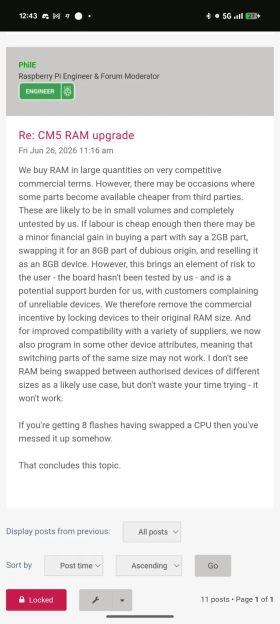
The Raspberry Pi Foundation (RPF) justifies this as follows: they saw third-party resellers sourcing low-RAM Compute Modules, upgrading them with RAM from unknown source and unknown stability. My observation is that they’d also be reselling the modules at a markup for purely commercial gain, while undercutting RPF who would otherwise direct that money into RnD, something I much enjoy to see them do. This creates perverse incentives and risk for people buying Raspberry Pi boards online, and RPF decided to limit this primarily for their users’ benefit, plus, if you ask me, some of theirs.
Is this justification true? I can’t know, but I went to check for signs of this happening, and the non-consensual RAM switcheroos seems to be happening all over the place! The related GitHub issues have a fair few pingbacks, and exploring them makes the problem look grim to me.
Off the cuff, I spent 15-20 minutes checking, and I can easily find fifteen different people on GitHub alone complaining about this failure. [(1) (2) (3) (4) (5) (6) (7) (8) (9) (10) (11) (12) (13) (14) (15)] As far as failure modes in popular hardware go, this is a surprisingly large number that suggests at least hundreds of hackers and hobbyists affected, if not more. None of them appear to have performed the upgrade themselves, hot air and flux way, the Hackaday way – all of them seemingly simply bought a “8 GB” version from either Aliexpress or Amazon. In at least one case, the seller immediately lied to the buyer about the issue and did not at all admit that an upgrade took place, even though it clearly did.
How It Makes Sense
This seems to map exactly to what RPF says happened. I can very much see why they would be worried. For instance – at the time they made this change, if my memory isn’t failing me, CM5 or CM4 2 GB boards went for $30-$40, 8 GB boards went for $100ish, and 4 GB boards were somewhere inbetween. As far as the intersection of hacker gadgets and industrial-lite hardware goes, that price is more than fair.
At this point, we’re no longer talking about people upgrading RAM on their boards for fun, and remember, you can still do all of that. Instead, that’s a fair bit of margin for someone to grab for 20 minutes of hot air work, someone who hasn’t done any of the RnD that RPF has put in. I personally much rather would see that margin go to RPF, and I’d like to have them deal with none of the headache, too.
Creating incentives for this kind of switcheroo business, unimpeded, seems deeply corrosive to me. For one, there’s zero repercussions for someone equipping those boards with substandard and harvested chips. RPF, as any experienced hardware company, would know about sourcing harvested or otherwise shady-origin RAM and other chips. A third party on Amazon/Aliexpress passing on those chips undisclosed to unqualified end users, now that goes far beyond the usual harvested chip horror stories. It turns into a game of “will/won’t the user notice the weirdness and ask the seller for a refund on time”, and at $100-$200, together with the ship-item-back requirement these prices bring, the answer will generally be “no”. Now, the buyer finds out about the tampering almost immediately, since Raspberry Pi boards auto-update the firmware.
If you don’t agree that this alone is corrosive – notice how this kind of “upgraded” board clearly requires sellers to misrepresent what they’re selling? You’re not going to find about this “upgrade” in the listing, there won’t be a “8GB reworked” label, clearly that would require lowering the price and/or cutting into the margins. Just like there’s no incentive for using a fresh RAM chip instead of a harvested one, there’s also zero incentive to be open about the mod. That’s no way to sell a pen, much less a full computer.
How RPF Does Things
Here’s the most confusing part to me. I’m seeing [Jeff] and others say that this is out of character for RPF to do. This does not seem true to me, at all? I don’t recall a time when Raspberry Pi has put effort into giving users freedom to hack on the board itself as soon as any sort of legal or competition issue arose.
Raspberry Pi puts cryptographic EEPROMs on Pi Camera boards, v2 and beyond, to thwart clone cameras that became so prolific and cheap with v1, I own at least five of those clones in different form-factors. I don’t like it, but at least the authenticity checks are disabled for Compute Module versions, as far as I remember. They still don’t sell the MLX7704 PMIC that immediately dies if you accidentally short-circuit GPIO header 5 V to 3.3 V, two male pins that are right on the side of the board and exceptionally easy to short-circuit from three sides simultaneously.
Raspberry Pi only ever publishes “reduced” schematics, ever since 2013, and they haven’t even released those for Pi 5. Neither have they published Pi 4 USB-C issue fix schematics despite having promised to do so. Half of the chips on a modern Raspberry Pi board are single-source and board-specific, the aforementioned PMIC being a fun example. Raspberry Pi boards ship closed-source software, from the bootloader to the GPU code whipping the CPU, to all the onboard wireless chips they have used so far, and this brings real issues you’ll stumble upon as you push the limits. The JTAG port has always been locked down, and even the bootloader is cryptographically signed – no patching out the RAM check code, sorry to spoil it.
I’m far from done listing ways in which Raspberry Pi prevents or works against low-level board tinkering, there’s at least five more things I could list from memory if I were bothered to check them thoroughly enough right now. Point is, if anyone came to Raspberry Pi for the low-level hackability of the hardware, there was never a shortage of reasons to look elsewhere. That was never the upside.
I don’t think low-level board hackery is what people genuinely expect from Raspberry Pi at all, even if they might say that they do – because it was never really there. You can’t genuinely expect something that was barely ever present. In contrast, there’s plenty of competition that publishes full board schematics, sometimes even gerbers, uses as much open code as possible, doesn’t sign bootloaders, and so on. Raspberry Pi is not open or hackable hardware by those metrics, and it never was. It’s not hackable hardware anywhere as much as it’s hardware made for hackers to use, and there’s clearly a big difference.
How Did We Get Here?
In practice, people clearly come to Raspberry Pi because of their community in the millions, meticulously explored and documented hardware, unmatched availability of boards and software alike, having solutions for nigh every little niggle and nitpick, RPF’s ability to experiment and release new cool hardware year after year, and even new standards they create along the way. Most of low-level problems get papered over through sheer scale – say, last year [Jonathan Clark] reverse-engineered the Raspberry Pi Zero 2 W, and then [TubeTime] reverse-engineered the Compute Module 5, how cool is that?
I could agree with [Jeff Geerling] that it could instead benefit from a “warranty bit” type of mechanism, but really, the bootloader downgrade isn’t that hard of a penalty, and “board autoupdates firmware, fails on next boot” is a much stronger indicator that you should go get a refund at haste. A refund is also way easier to get if you say “hey, the board stopped working immediately”, and who knows, maybe you’ll get a refund and get to keep the board so that you can downgrade its firmware and still use it! Win-win, seller loses out on selling you a shady board, and you get a shady board that might just work, for free. Chances are, we wouldn’t even be talking about the RAM swap restrictions if it weren’t for the RAM shortage, and that is not RPF’s fault at all whatsoever.
My advice: don’t lament Raspberry Pi RAM upgrades, especially given they’re only slightly harder to perform now. Very few hackers ever performed them, the main audience for them turned out to be dodgy hardware resellers online, and in most cases, repair doesn’t seem to be impeded at all, either.
Think of the users that will no longer be fooled by a shady seller on Amazon, especially now that the perverse incentives for board mods and reusing harvested RAM chips are at their highest. RAM shortages might make any RAM topic hurt deeper than usual, which to me is the most likely reason we’re discussing this in 2026 instead of 2025, but this change is far more likely to help a hacker in practice, than it is to hurt.
But Arya, the scammers can just load an old firmware, that's way easier than reworking with dubious RAM chips. So, how does it protect folks from being scammed?
 Log in





 For the reference, this bootloader change happened almost exactly two years ago, at some point between September 10 and September 23, 2024. This was exactly a year and a half after we covered the first Raspberry Pi RAM upgrade. What changed?